The Urgency Play: Psychology Behind Scams and Defense
Why do smart people fall for scams? Because the con works on human reflexes, not intellect. Modern fraudsters manufacture urgency, authority, and fear to short-circuit our decision-making. That same formula helped intruders social-engineer their way into MGM Resorts in 2023—causing days of disruption—without exploiting a single software flaw. Understanding the psychology is your best defense.
The Incident: What We Know
In September 2023, attackers used phone-based social engineering (vishing) to impersonate employees and persuade help-desk staff to reset credentials at MGM Resorts. With legitimate login access in hand, they pivoted rapidly inside the network, disrupting operations from hotel check-ins to slot machines. The playbook wasn’t exotic malware; it was a script built on urgency and authority. Similar tactics have driven breaches at tech firms and critical suppliers—often by convincing just one person to “help” right now.
Why this matters: social engineering scales. It bypasses technical controls by targeting people and processes. Data from multiple authorities shows the human channel is the fraud economy’s profit engine:
- FBI IC3 logged 880,418 complaints in 2023, with reported losses topping $12.5 billion—an all-time high. Business Email Compromise (BEC), a quintessential social-engineering crime, alone accounted for about $2.9 billion in reported losses (IC3 2023).
- The FTC reports consumers lost over $10 billion to fraud in 2023, up 14% from 2022, driven by imposter and phishing-style schemes (FTC 2024 press release).
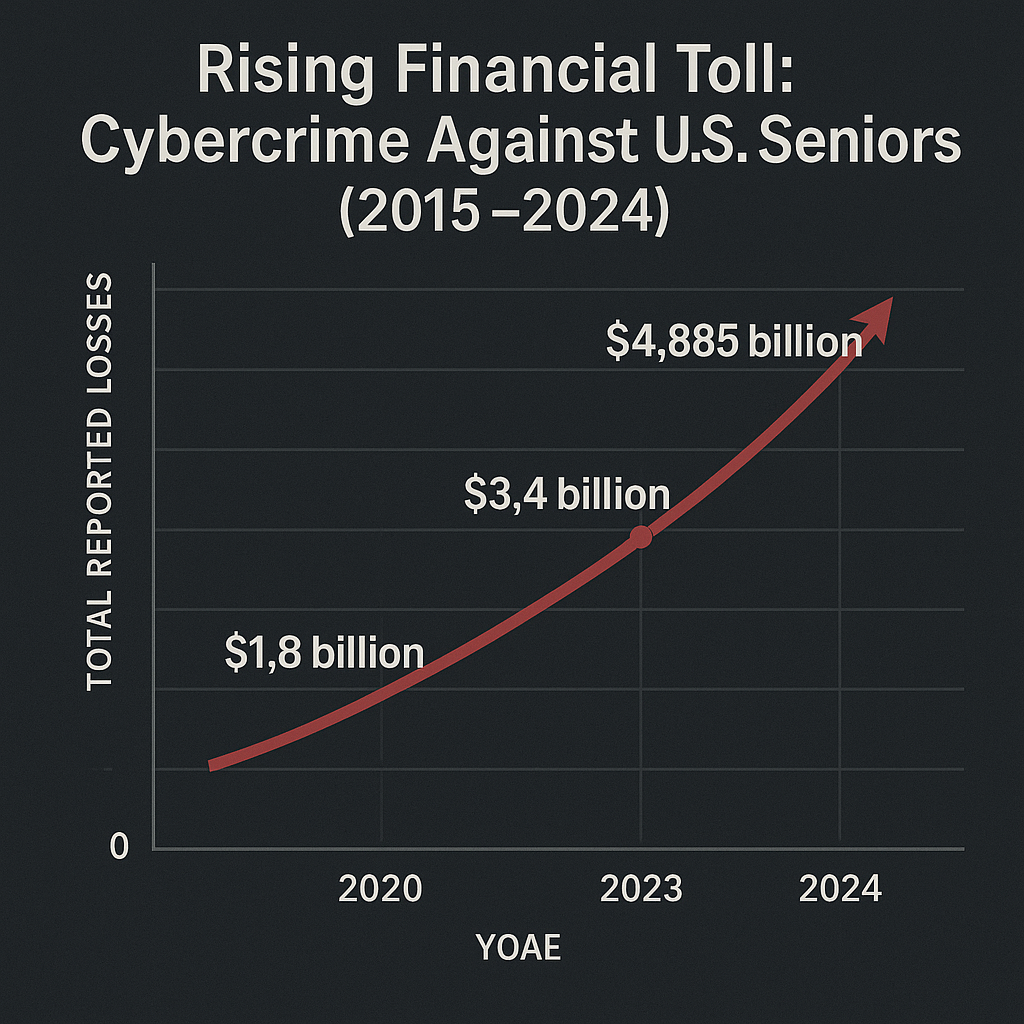
- Older adults reported losses exceeding $3.4 billion in 2023, with higher median losses than younger victims, reflecting how social pressure and trust can be exploited (FBI IC3 Elder Fraud 2023).
The Mechanics: How They Did It
Social engineers weaponize cognitive shortcuts—fast, automatic judgments we rely on in the real world—to bypass slower, analytical thinking. Three core levers appear again and again:
- Urgency: “Act in 5 minutes or your account will be closed.” Time pressure disrupts verification. You click or comply to avoid an immediate loss—exactly the response the attacker wants.
- Authority: The message appears to come from a boss, bank, IT, or a familiar brand. Logos, spoofed caller ID, insider jargon, and email signatures give just enough credibility to lower your guard.
- Fear (Loss Aversion): People are more motivated to avoid loss than to achieve gain. Threats like account closure, missed payroll, legal trouble, or reputational damage force snap decisions.
Common delivery vectors:
- Phishing (email): Links to fake login portals (“re-authenticate now”).
- Vishing (voice calls): Convincing phone agents to reset access or read one-time codes.
- Smishing (SMS): Texts with short URLs and fake “fraud alert” callbacks.
- Help-desk pivoting: Impersonation plus plausible ticket numbers to trigger password or MFA resets.
Once the attacker gets a foothold—often a single working login or a bypassed multifactor prompt—they escalate: enrolling their own device for MFA, creating new accounts, or changing recovery options. In MGM’s case, calling the right person at the right time was the exploit.
Who Is At Risk?
Everyone with a phone number, inbox, or support channel. But some environments are uniquely exposed:
- Frontline staff and help desks: High interaction volume + mandate to resolve issues quickly = ideal targets.
- Executives and finance teams: Attractive for wire fraud and BEC, where one rushed approval can mean seven-figure losses.
- Older adults: Higher reported losses and targeted via imposter scams (tech support, grandparent scams).
- Small and mid-sized businesses: Lean teams and outsourced IT can mean inconsistent verification practices.
Real-world case study: MGM Resorts (2023). Attackers posed as employees over the phone, persuaded support to reset access, and disrupted operations for days. While details vary by report, the core move was human manipulation—not a zero-day exploit. The same pattern has appeared in past breaches at cloud communications providers and SaaS vendors via voice-phishing campaigns that captured credentials and MFA codes.
Specific Defense Steps
- Slow the tempo: institute a “10-second rule.” Before clicking or complying, pause and ask: Is this normal? Does this match prior behavior? Legitimate institutions rarely demand instant action via phone or SMS.
- Set ironclad callback rules. If a “boss,” “bank,” or “help desk” calls you, end the call and redial using a number you retrieve yourself (back of card, official website, known internal directory). Never use the number a caller or texter provides.
- Pin down identity with out-of-band verification. For any request that changes money, access, or MFA, require two independent confirmations (e.g., email + in-person or chat + unique code through a separate channel).
- Guard MFA like a password. Never read one-time codes to anyone who calls you. Favor phishing-resistant authentication (FIDO2 passkeys or security keys) over SMS or voice calls, which can be socially engineered or SIM-swapped.
- Use “transaction verification” for money movement. Configure banking platforms to require per-transaction confirmation with details displayed (payee, amount, account). Train staff to verify changes to vendor banking details via a known phone number.
- Lock down help-desk workflows. Require employee ID plus two difficult-to-spoof factors (e.g., SSO push to a registered device + HR photo verification) before password/MFA resets. Log and audit every exception.
- Adopt least privilege and just-in-time access. Reduce blast radius: limit who can approve payments, reset credentials, or enroll MFA devices. Temporary elevation should auto-expire and be logged.
- Simulate the con. Run periodic phishing/vishing drills with realistic scripts (authority + urgency). Measure report rates and time-to-escalation. Use failures as coaching moments, not punishments.
- Harden your public footprint. Remove direct-dial support numbers from public pages. Publish one intake number with IVR verification. Minimize employee details on LinkedIn and company sites that fuel impersonation.
- Create a “safe word” for families and teams. Establish a pre-arranged phrase to verify identity during emergencies or money requests. Rotate it periodically.
Expert Opinion
When a message demands instant action, assume it’s social engineering until proven otherwise. Verification should be slower by design than the attacker’s tempo.
Conclusion
Fraudsters don’t need malware if they can speed you up. The fix is process plus psychology: slow things down, verify through separate channels, favor phishing-resistant authentication, and harden help-desk and payment workflows. Organizations that rehearse these moves—and individuals who adopt them at home—turn urgency into a red flag instead of a trigger.
Appendix: Quick Red Flags and Safer Alternatives
- Red flag: “Your account will be closed in 10 minutes. Click here.”
Do instead: Log in via a saved bookmark or the official app. If in doubt, call the institution using the number on your card or website. - Red flag: A caller asks you to read a one-time code or approve a login prompt.
Do instead: Hang up. No legitimate support will request MFA codes. Change your password and review sessions. - Red flag: Vendor emails new banking details and asks for an urgent payment today.
Do instead: Verify by calling your known contact at a previously used number. Require dual approval. - Red flag: Help desk resets MFA based on easily found data (full name, title, phone).
Do instead: Require out-of-band device verification and a supervisor override for exceptions.
Sources and Data Notes
Loss figures refer to reported losses; true totals are likely higher due to underreporting. Case-study details are compiled from contemporary reporting and official advisories.